N8N WorkShop - Day 02
Workflow Flow
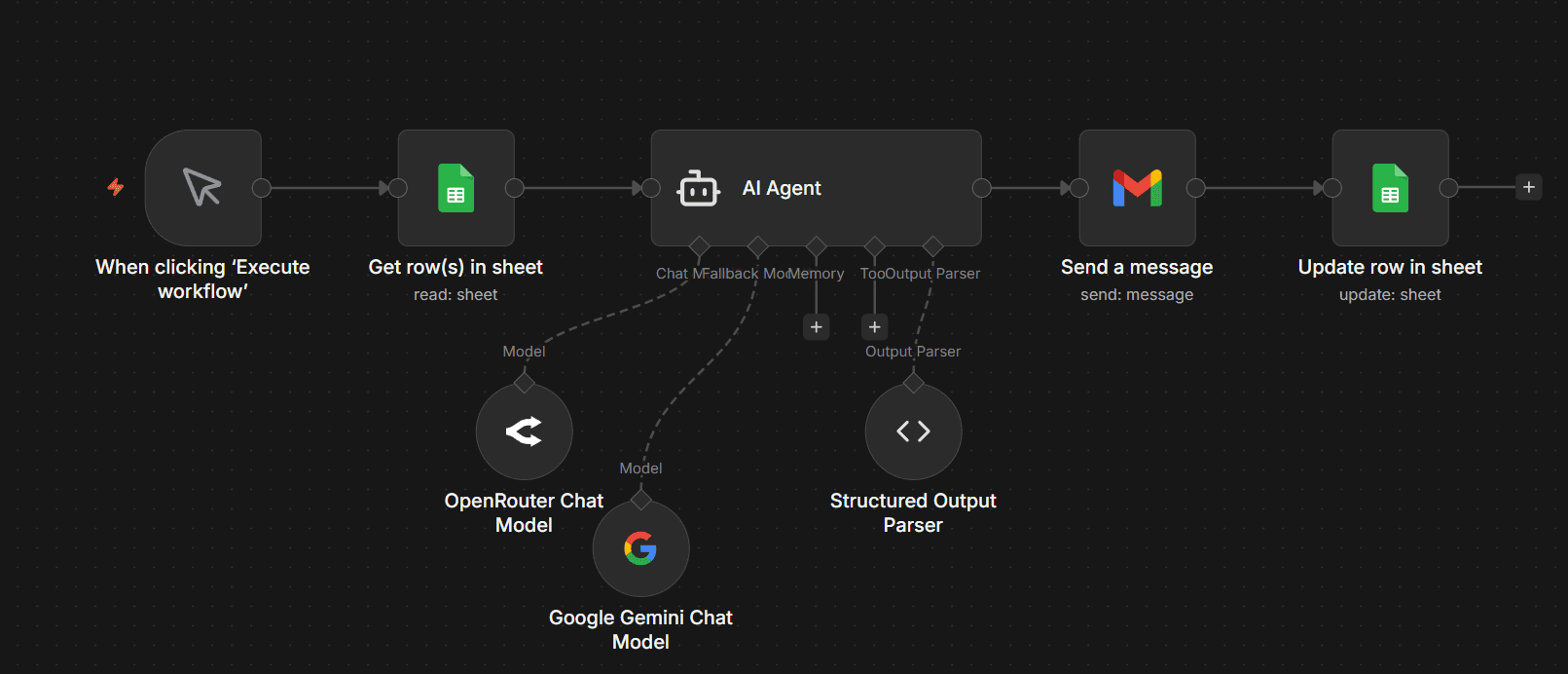
Setup & APIs Required (Day 02)
1) Manual Trigger (Execute Workflow)
Used to run workflows manually for testing and batch processing.
- No webhook required
- Best for bulk automation
Objectives
This workflow focuses on automating bulk data processing using AI. It reads multiple records from Google Sheets, processes them intelligently, generates structured outputs, sends automated emails, and updates the data back into the sheet.
Recap + Workflow Overview
Quick revision of Day 01 concepts and introduction to batch processing workflow design.
Google Sheets Data Handling
Learn how to fetch multiple rows and structure data for AI processing.
AI Processing + Multi-Model Logic
Process data using AI Agent with Gemini and fallback OpenRouter for reliability.
Output Parsing + Email Automation
Convert AI output into structured JSON and send dynamic emails using Gmail.
Testing, Debugging & Final Execution
Test the workflow, handle errors, and execute full automation with real data.
Day 02 Workflow Breakdown
Step 1: Manual Trigger
Type: Manual Execution
Starts workflow manually using "Execute Workflow" button.
Step 2: Get Rows from Google Sheets
Type: Read Operation
Fetches all rows from the sheet for batch processing.
Config- Operation: Get Rows
- Return: All rows
Step 3: AI Agent Processing
Purpose: Main processing logic
System Prompt Behavior- Reads each row from Google Sheets
- Generates meaningful output
- Avoids incorrect assumptions
Step 4: Multi-Model Handling
Uses fallback model to ensure stable responses.
Models- Primary: Gemini
- Fallback: OpenRouter
Step 5: Structured Output Parser
Converts AI output into structured JSON format.
Purpose- Clean structured response
- Easy integration with Gmail & Sheets
Step 6: Send Email (Gmail)
Sends personalized emails based on processed AI data.
Config- Dynamic Email Content
- Uses parsed JSON fields
Step 7: Update Row in Google Sheets
Updates processed data back into the sheet.
Config- Operation: Update Row
- Fields updated dynamically